LinksDB Module

Hierarchical Listings in Views 2: Replicating the LinksDB Directory

The LinksDB module provides a nice "it just works" way for implementing a classic Links page. The standout feature is its hierarchical display of the URLs. Even after Views and CCK arrived, the hierarchical display was worth staying with the module. Sadly, with a site to upgrade and no Drupal 6 version of LinksDB in sight, it was time to convert.

This post is part 2 of 2 of how I migrated the CIPS Vancouver Security SIG Links Directory page from LinksDB to CCK/Views. In part 1, Migrating LinksDB Module Data to CCK, I covered migrating LinksDB data into Drupal nodes and taxonomy. In this post I cover creating the URL Links directory page in Views.

Even if you're not interested in LinksDB, this post provides an example of theming Views to display a hierarchical list using taxonomy to define the hierarchy. This same technique was used to render my Drupal Notes page.

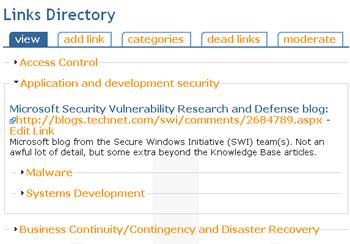
Here are before and after screen shots of the SecSIG Links Directory page:

LinksDB Module Page

LinksDB Module Page Screen Shot

Views Replacement of LinksDB Module Page

Views Replacement of LinksDB Module Page Screen Shot

View Definition

The View definition is un-extraordinary. Here is a snapshot of its edit page, an export of it is included at end of this article.

Migrating LinksDB Module Data to CCK

LinksDB Module Screen ShotThe LinksDB module provides a nice "it just works" way for implementing a classic Links or Resources page. The standout feature is its hierarchical display of the URLs. Even after Views and CCK arrived, the hierarchical display was worth staying with the module. Sadly, with a site to upgrade and no Drupal 6 version of LinksDB in sight, it was time to convert.

This post is part 1 of 2 of how I migrated the CIPS Vancouver Security SIG Links Directory page from LinksDB to CCK/Views. It covers migrating LinksDB data into Drupal nodes. Creating a hierarchical display with Views is covered in part 2.

Creating a CCK node to replace the LinksDB URL entry is trivial. The two areas requiring work are migrating the data in the LinksDB database tables to standard Drupal data objects (CCK and Taxonomy), and creating a hierarchical listing of the URLs in Views.

Even if you're not interested in LinksDB, this post provides an example of programmatically importing data into Drupal using a command line script.

LinksDB also provides some user-facing tools for suggesting links, counting outgoing link clicks, and flagging dead links. Due to spam the suggestion tool was turned off; users have been savvy enough to use the contact form for suggesting links. The tool for flagging dead links didn't prove that useful and the tool for counting outgoing links was never used. These tools were therefore not re-created.

The CCK Node

The 4 fields defining a link entry are: name, URL, description, and category. Here's how I defined them in CCK.

Syndicate content Syndicate content