Drupal 5

Drupal Command Line Script Template

There are development tasks better suited to running in a command-line script than in the Drupal web interface. The two most notable in my experience are code fragment testing, especially when exploring how an API works, and data import/export. Happily, this kind of scripting is possible with Drupal.

The PHP code shown below, created from examples seen in Planet Drupal posts, and later in the drush module, is serving me well as a command-line script template. It works in both Drupal 5 and 6.

Script Template

<?php
  $stdout
= fopen('php://stdout', 'w');
 
fwrite($stdout, "Script Template\n");

 
// Site specific variables
 
$username = "Dale";
 
$drupal_base_url = parse_url('http://www.example.com');

 
$_SERVER['HTTP_HOST'] = $drupal_base_url['host'];
 
$_SERVER['PHP_SELF'] = $drupal_base_url['path'].'/index.php';
 
$_SERVER['REQUEST_URI'] = $_SERVER['SCRIPT_NAME'] = $_SERVER['PHP_SELF'];
 
$_SERVER['REMOTE_ADDR'] = NULL;
 
$_SERVER['REQUEST_METHOD'] = NULL;

  require_once
'includes/bootstrap.inc';
 
drupal_bootstrap(DRUPAL_BOOTSTRAP_FULL);

  global
$user;
 
$user = user_load(array('name' => $username));

 
//
  //
  // Drupal code here
  //
  //
?>

Usage Notes

A User Facing Content Management View

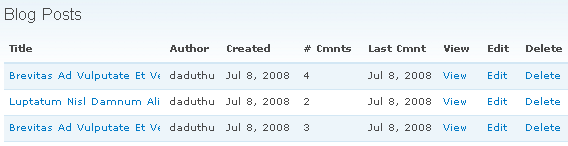
Drupal does not have user facing content management out of the box. Fortunately, a user facing content management page can be created in 5 minutes using Views. It's not a panacea, but can provide part of the solution.

User Content Management View

I typically use this view in conjunction with a menu block. The menu block has visibility set by role and contains links useful to the user, such as a link to this view, the content creation URL (node/add/foo), and the user's profile.

Creating Links (aka Anchor tags) - The "l" Function

Note: This article covers the l function for Drupal 5. While most of the information is still applicable to Drupal 6, the function call has changed. See http://api.drupal.org/api/function/l/6 for the Drupal 6 version of the call.

Why would anchor tags warrant attention? It's just a text string after all. Concatenate a variable or two with some text to create the link and you're done, right? Maybe.

Do you want to move your code between different Drupal installations? If the answer is yes you need to worry about handling the differences between servers, things like whether clean URLs (1) are enabled or the instance is installed in a base directory (2).

Having to test and determine output based on specific conditions sounds like a good candidate for a function. The Drupal programmers who came before you though so as well, thus we have the "l" function.

The l function brings with it other advantages. If the link is Drupal content with a URL path alias the l function will automatically use the path alias, even if it's passed the Drupal "system" URL. If the URL you're specifying happens to be the current page, it automatically adds class="active", which is very handy when using CSS to theme navigation links.
Syndicate content Syndicate content