Views
Theming Views 2 – The Basics
Submitted by dale on December 29, 2008 - 6:46pmViews 2 provides a well structured theming environment allowing presentation control for each element of your view. And in my humble opinion, it rocks!
Those with no past experience with Views 1 will find Views 2 uses standard PHPTemplate theming techniques. All of your experience theming Drupal can be used with Views.
Views 1 themers starting with Views 2 might be a bit confused at first. I was. The single callback in template.php where everything happened is gone, refactored into a consistent framework of template files. All of the freedom that existed in the single function still exists with the added benefit of a well defined structure.
Overview
Views handles querying the database and organizing the information for display. It creates the output display by converting retrieved data into variables and passing them through a series of templates. Each template handles a different "level" of output creation. The number of templates used to create a view's output depends on the view's type and style, as well as the number of fields involved. These templates exist as files (with a .tpl.php extension), in either the module's or the theme's directory, and follow PHPTemplate's theming conventions.
Generally speaking, the template levels are:
A User Facing Content Management View
Submitted by dale on July 8, 2008 - 1:56pmDrupal does not have user facing content management out of the box. Fortunately, a user facing content management page can be created in 5 minutes using Views. It's not a panacea, but can provide part of the solution.
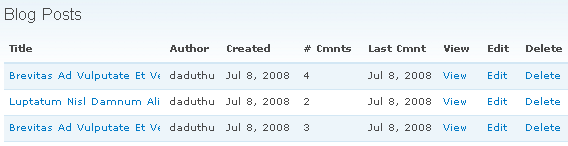
I typically use this view in conjunction with a menu block. The menu block has visibility set by role and contains links useful to the user, such as a link to this view, the content creation URL (node/add/foo), and the user's profile.
Views Schedule Grid Presentation Write-Up Done!
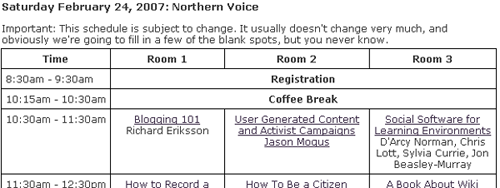
Submitted by dale on February 2, 2007 - 4:23pmAs mentioned before, I did a presentation at the January Drupal Meeting on how I used the Views module to do this:

2007.northernvoice.ca/schedule
My presentation write-up is done and posted here: Making a Scheduling Grid with Views Presentation Write-Up